01 / CHARTS
Charts built for analysis.
20 chart types, 201 indicators and 77 drawing tools, with bar replay and up to fifteen charts side by side.
Candles · Footprint · Heatmap · Volume profile1,100+ traders a day · 201 indicators · 20 chart types · 4 exchanges
Charts, order flow, derivatives, options, screening, a no-code Builder for your own indicators and strategies, and an AI agent,
on live data from Binance, Bybit, OKX and Hyperliquid. All in one browser tab.
The core terminal is free. No account to chart. Explore optional Founders membership for paid research tools.
“What is behind this move?”
HOW IT WORKS
Candles, footprint, liquidity heatmap or volume profile, down to one-second bars, with 201 indicators and 77 drawing tools.
Every chart type runs on live exchange data.
ONE WORKSPACE
Charts, order flow and research share
one symbol, one clock and one layout.
01 / CHARTS
20 chart types, 201 indicators and 77 drawing tools, with bar replay and up to fifteen charts side by side.
Candles · Footprint · Heatmap · Volume profile02 / ORDER FLOW & DERIVATIVES
Footprint, cumulative delta and a liquidity heatmap show who is trading. Funding, open interest and options positioning show how they are leaning.
Order flow · Derivatives · Options03 / RESEARCH
Create an indicator for the question you want to answer. Turn your rules into a strategy and challenge it in replay or across markets. Your research does not have to stop at the tools somebody else designed.
Builder · Custom indicators · Backtesting · Replay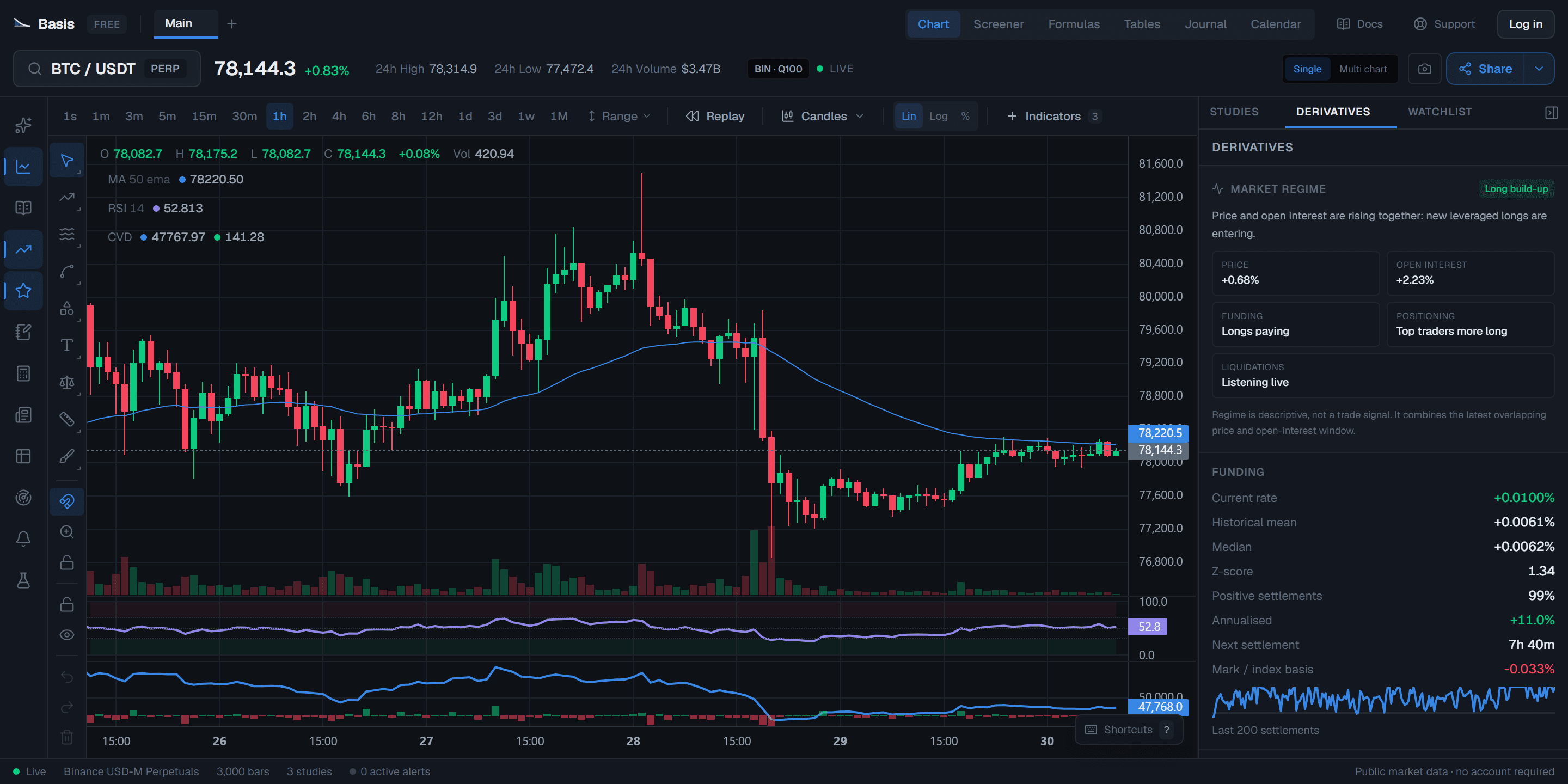
BASIS BUILDER
Wire price, order flow, derivatives and any of 199 chart indicators into an indicator of your own or a complete strategy. Watch it on a live chart, test it against history and see exactly where it breaks.
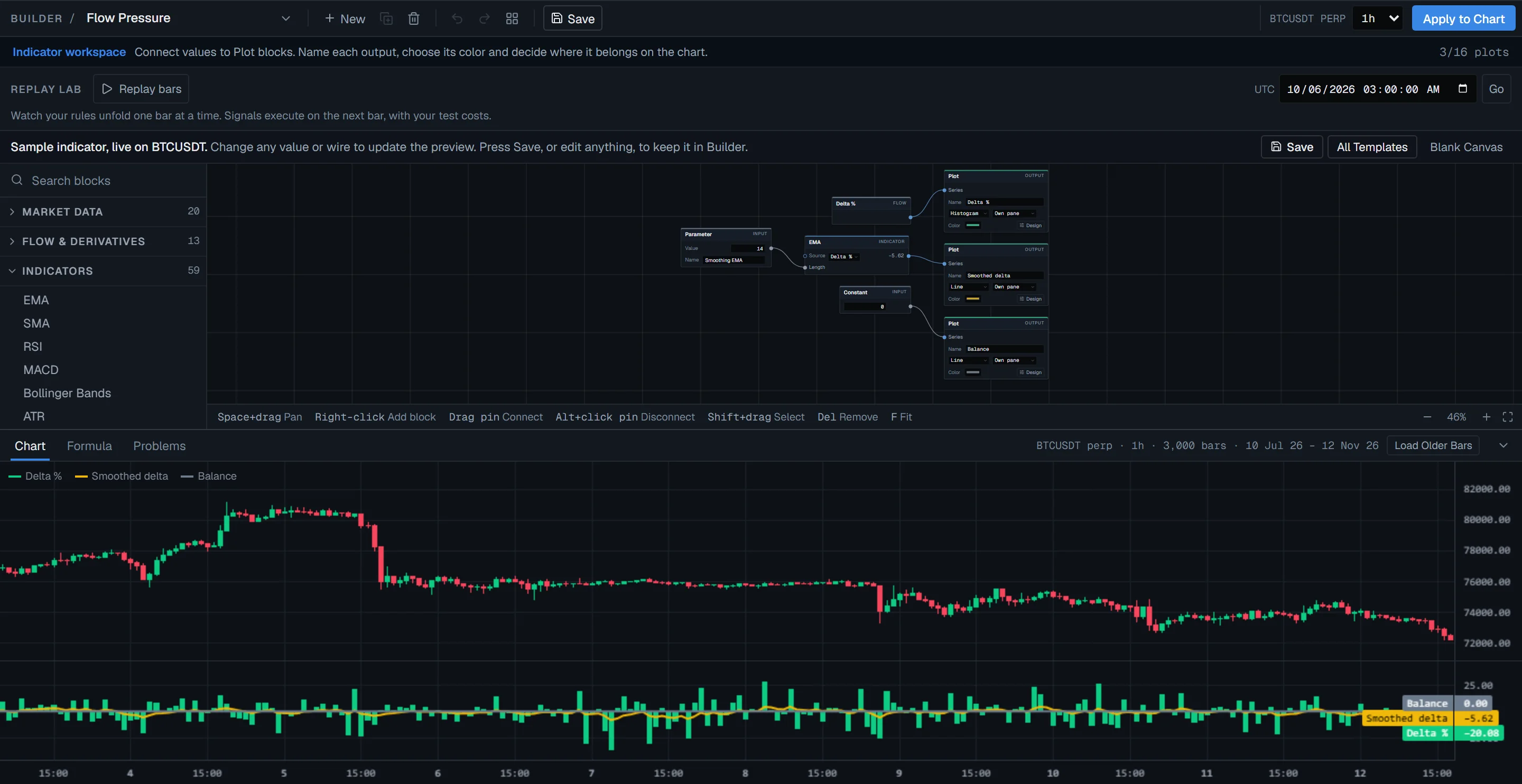
Flow Pressure, one of the starting templates: taker delta as a share of volume, drawn as a histogram, smoothed by an EMA and set against a zero line. Rename it, restyle it, put it on your chart.
Actual capture · BTCUSDT perp · 1h · 12 Nov 2026THE TOOLS
Find the setup, check the leverage behind it, size the position, set the alert and review the result.
Pick a tool to see what it does.
Builder
Your trading idea should not depend on someone else writing a script. Turn it into a custom indicator or testable strategy with visual blocks. Choose how it looks, inspect how it works and bring it to your chart.
Illustrative trend ribbon — create named plots, style each line and fill the space between them.
Market discovery
Build nested conditions from price, volume, indicators, Formula Lab models or strategy signals. Rank a crypto universe, inspect every condition and turn the screen into a monitor.
Derivatives intelligence
Funding, open interest, positioning and liquidation context sit beside price, aligned to the same instrument and market clock — with funding compared across venues on their real settlement intervals.
Funding
-0.0031%
Open interest
$18.42B
Long / short
0.94
Options analytics
Open interest, implied volatility, skew, max pain and dealer gamma merged across Deribit, OKX, Bybit and Binance, with the trades behind them and a strategy lab to test a position before you take it.
30D ATM IV
36.4%
25Δ skew
-1.2 pts
Zero gamma
78,900
Inside the auction
Go from resting liquidity to executed volume without changing platforms. A live heatmap, DOM and tape meet configurable footprint ladders on Binance spot and USD-M markets. Read the pressure, the response and the coverage behind every observation.
Risk calculator
Set entry, invalidation and target on the chart. Basis calculates position size, risk-to-reward and maximum loss from your account rules.
R : R
3.00
Size
$695
Alerts & automation
Watch a price, drawing, indicator or entire screen. Schedule recurring agent research around sessions, events or your own routine.
Trading journal
Record the thesis, execution and outcome, then review expectancy, setup quality and behavioral patterns across your own history.
Trades
42
Win rate
57.1%
Expectancy
+0.34R
Profit factor
1.62
Quantitative tables
Compare symbols in rows, add indicator and formula columns, sort the result and chart the series without leaving the terminal.
Formula Lab & sandbox
Define custom formulas and strategies, run controlled historical tests, search parameters and check whether an apparent edge survives held-out data.
Workspaces
Build multi-chart layouts, synchronize symbols and timeframes, and preserve the panel arrangement that matches your workflow.
Calendar & news
Filter the market calendar by impact and keep crypto headlines close to the chart, so event risk becomes part of the plan rather than an excuse afterward.
Model Context Protocol
Connect Claude, ChatGPT or Cursor and your own assistant reads live order flow, derivatives and 201 indicators from four venues, backtests an idea, then builds a chart and hands you the link. You bring a compatible AI client; Basis supplies the market data and tools. Your client sets its own availability, fees and limits.
Public tools: no Basis keyNo Basis account for public toolsOne URL
The whole setup
https://www.basischarts.com/api/mcp
Add this URL in your compatible client to use public tools. Founder tools use your private membership connection. The external AI is not supplied by Basis.
What free includes
Basis brings charts, live derivatives, options analytics, order flow and backtesting together in a free core terminal. Optional Founders membership adds Agent Plus, Whale Intelligence, Technical Read and extended market history alongside the free tools.
One shared context
Charts, derivatives, options, order flow, replay and research stay aligned to the same symbol and timeframe.
Free core tools
Indicators, multi-chart layouts, order flow, Builder and backtesting are included in the free terminal. Founders adds a separate research toolkit.
AI is the multiplier
Agent Plus (beta) can build indicators and strategies, backtest and scan markets. Included with both Founder plans, no API key needed; usage limits apply. BYOK and MCP remain available with external fees and client requirements separate.
Public and free access only
Paid capabilities are marked as paid instead of being counted as part of a competitor's free offer.
A usable charting workspace, not a static market page.
Simultaneous studies on the same chart.
Exact 1s bars built from public trades.
Move through historical candles without future leakage.
Funding, open interest, positioning and liquidations.
DOM, tape, trades, liquidity heatmap and flow signals.
Volume-at-price and bid/ask participation.
An agent that can inspect data and operate the workspace.
Connect rules and test them, rather than writing a script.
Turn analysis into a saved, reviewable process.
The narrow positioning revealed by the rows above.
“Not advertised” means the capability could not be verified on the cited public plan page; it is not a claim that the product can never provide it. Scope, venues and plan terms can change.
Where Basis is going
Every terminal ever built hands you the data and leaves the work to you. Basis has 201 indicators, order flow, derivatives and a back-tester — and an assistant that can operate all of it on your behalf. The charts are what Basis is. The agent is what it is for.
No query language, no script, no syntax to learn first. You write the request the way you would say it out loud, and the assistant works out what that means in terms of the platform.
The entire input
Build me a volatility breakout strategy with a trailing stop on BTC. Backtest it and put it on the chart.
84 of them — the order book, the tape, funding, liquidations, whale positioning, the screener, the strategy sandbox. You do not choose which; it decides what the question needs and fetches it. Every call it makes stays on screen.
What it reached for, unprompted
One request. 84 tools available, six chosen, every call visible.
Asked for a strategy, it writes the program, runs it over three thousand real bars, and publishes it to your chart with the entries and exits drawn in. The answer is the thing itself, not a paragraph about the thing.
From one sentence
The same run that produced the strategy above said this about its own result, unprompted. An assistant that only ever agrees with you is not an analyst — it is a mirror with a subscription.
Unprompted, in its own words
“With only 29 trades the result is too few to distinguish a genuine edge from random variation.”
It built the strategy it was asked for, and then said the honest thing about it.
Agent Plus is included with both Founder plans. Create indicators and strategies, run backtests and scan markets with supported tools—no API key needed. AI usage limits apply; lifetime usage renews every 30 days. You review the work. It never places trades.
Open the terminalPrefer your own AI? The providers shown are optional BYOK choices; your key stays in browser storage, outside account sync. MCP connects a compatible external AI client instead. External fees, limits and account requirements are separate.
Free core. Optional Founders membership.
Charts, replay, order flow, live derivatives, options analytics and backtesting stay free. When you want more context behind a move, Founders adds a deeper research layer with either 30-day access or a one-time lifetime membership.
A complete trading workspace you can open before signing up.
From idea to review
Screen a setup, test it, set an alert and keep your research in one place. These core workflows do not require a paid membership.
Your core tools stay free, whether you join Founders or not.
Build your ideas. Check the evidence.
Create and backtest with Agent Plus, inspect screened whale positions, compare 7 timeframes, and research Nvidia or gold next to Bitcoin.
Explore FoundersMillion-dollar traders, on your chart
A multi-stage screen of public Hyperliquid records picks the whales. See each one's entry, size and liquidation price, and get an alert when they move.
40 indicators. 7 timeframes. One answer.
Technical Read shows which signals agree on any coin, and how similar readings played out before.
Nvidia, gold, EUR/USD and the S&P 500, next to Bitcoin
350+ stock, ETF, index, commodity and forex markets from Binance, Hyperliquid and Bybit, charted with every Basis tool, with a real footprint on Binance’s.
As many watchlists as you trade New
Named lists with sections, flags and notes, imported from TradingView, and any screen saved as a list in one click.
Your strategy deserves its own timeframe. New
Built a setup that doesn’t fit standard intervals? Choose 15s or 30s on Binance, or your own minutes, hours and days—with footprint, indicators and multi-chart on the same clock. Save up to 12 favorite intervals on this browser and return to your setup in a click.
Charts that move as one New
One crosshair and one scroll across up to fifteen charts, symbol links for multi-timeframe work, lead layouts and saved workspaces.
50 screens, already built New
Ready-made screens for crowded positioning, squeeze conditions, breakouts, order flow and risk, read from funding, open interest, top-trader positioning and taker flow. Add one, run it, make it yours.
Spot the structure. See what confirms it. New
Pattern Radar automatically maps chart patterns and potential reversal points. Inspect the evidence, confirmation and invalidation levels, then turn a boundary into an alert. Setups to investigate—not promises about the next move.
Agent Plus (beta). From your idea to your chart.
Create indicators and strategies, run backtests and scan markets with supported Basis tools. Included in both plans; no API key needed. AI usage limits apply; lifetime usage renews every 30 days. You review the work and control permissions. No trade execution.
Also included: volume profiles read from Binance trades, Telegram alerts on the lines you draw, the derivatives archive, Founders tools inside ChatGPT, Claude or Cursor, and priority Telegram contact. The numbered badge is exclusive to lifetime Founders.
One payment. No automatic renewal.
Your access lasts 30 days. Renew manually when you want another 30 days; no card or wallet is charged automatically.
Pay by card. No crypto needed.
Card, Apple Pay, Google Pay, Alipay and more, depending on your device and location. Secure checkout with Creem. Crypto via NOWPayments is also available.
Review your final total before paying. Payments & refund requests
Before you open it
The core terminal is free, and there is no trial to expire. All 201 indicators, 20 chart types, alerts, multi-chart layouts, backtesting, the screener and the trading journal are available to everyone. An account is free and optional for charting; it keeps your layouts, drawings and saved work with you between devices. Optional Founders membership starts at $15 USD for 30 days, or $50 USD once for lifetime access ($79 from December 1). Pay by card through Creem; no crypto is needed. Crypto through NOWPayments is also available. Neither plan renews automatically. Any applicable taxes or fees are shown at checkout. Agent Plus is included with either Founder plan, with AI usage limits and no API key needed. Optional BYOK and MCP let you connect your own AI; any external provider fees or client plan requirements are separate.
Founders adds Agent Plus (beta): describe a strategy or indicator, test it on historical data, scan markets and bring the work onto your chart. No API key or separate AI subscription is needed. It also includes Whale Intelligence, Technical Read, Pattern Radar, custom timeframes, the curated screener library, advanced Telegram alerts, extended derivatives and options history, stocks and commodities on chart, private Founders MCP tools and priority Telegram contact. Both plans include the Founders tools, including new Founder features during your access; the numbered Founder badge is exclusive to lifetime membership. The 30-day plan includes AI usage for 30 days from verified payment while membership is active; lifetime AI usage renews every 30 days. Usage limits apply, unused AI usage does not roll over, and there are no automatic top-ups or overage charges. These are optional additions; the core charting and research tools stay free. Membership belongs to an account and opens after verified payment; paying by card makes the account if you have none.
Yes, you can pay by card through Creem. No crypto wallet or exchange account is required. If you prefer crypto, choose NOWPayments instead. Both methods are available for the 30-day and lifetime plans. You review the final total on the payment provider’s checkout before paying, and access opens after payment is verified. There is no automatic renewal: 30-day access ends unless you renew manually; lifetime access has no renewal payment. Card payments come with a 7-day money-back guarantee: ask within 7 days for a full refund, no questions asked. For refund requests and provider-specific details, see Payments & refunds at basischarts.com/payments.
No. Opening the terminal puts you straight on a live chart with no sign-up, no email and no card. A free account keeps saved workspaces, drawings, alerts and journal entries across devices. Founders membership belongs to an account: paying by card makes one with the email you pay with, and paying with crypto needs one first.
Unlimited indicators on a chart rather than a per-chart cap, 20 chart types including Heikin Ashi, Renko, Kagi, 3 Line Break and Point & Figure, plus range-bar and one-second timeframes. Multi-chart synced layouts, order-flow footprint data, live derivatives context, a market screener you can backtest, and a formula language with 129 functions. These core tools do not require a paid membership. To work with AI, use your own provider key (BYOK), connect a compatible external assistant through MCP, or join Founders for included Agent Plus usage. Agent Plus has usage limits; external AI providers and clients set their own fees, limits and requirements.
Yes. Builder gives you 408 blocks for turning market data and your logic into custom indicators or strategies. Create named line and histogram plots, choose a price overlay or a separate pane, then save and apply your indicator to the chart. For strategies, connect entries and exits and test them with fees, slippage and next-bar fills. Replay, parameter search and tests across up to 100 coins help challenge the result. Core Builder is free, needs no account to start and places no real orders. Market-data coverage and existing market-access rules still apply.
Live spot and perpetual futures data from major venues, including candles down to one-second bars on Binance, order-flow footprint, derivatives context — funding rates, open interest, long/short positioning, taker flow and liquidations — and options from Deribit, OKX, Bybit and Binance. Market data is public and needs no exchange account.
Yes, free. The options workspace merges Deribit, OKX, Bybit and Binance for Bitcoin, Ethereum and the altcoins they list: open interest by strike and expiry, max pain, modelled dealer gamma, vanna and charm, implied volatility, skew, the volatility surface, options flow with block trades, the full chain and a multi-leg strategy lab. Volatility is read from one reference venue rather than averaged, and every modelled figure states its assumption.
The agent uses real tools — it reads candles, computes indicators, checks derivatives, draws on the chart, creates custom indicators and strategies, builds screens, runs backtests and sets alerts using supported Basis tools. Agent Plus (beta) runs inside Basis and is included with both Founder plans: no API key or separate AI subscription is needed. AI usage limits apply. BYOK remains an option: your provider key stays in browser storage, outside account sync, and is sent to your chosen provider for requests. Any provider charges are separate. MCP lets you work from a compatible external AI client instead. You control workspace permissions and review generated code, evidence and historical results. The agent does not place trades; backtests do not guarantee future performance.
Yes. Basis runs an MCP server at basischarts.com/api/mcp, so any client that speaks the Model Context Protocol can use the same market data, order flow, indicators, screens and backtests from wherever you already work. Public Basis MCP tools need no Basis account or Basis API key. You bring a compatible AI client and model; availability, fees and account requirements depend on that client. Basis does not supply the external AI. Founder-only MCP tools require active membership and a private connection key. The assistant can also build a chart and hand back a link that opens it live. See setup instructions at basischarts.com/mcp.
No. Basis is an analysis and research terminal — it reads market data and does not connect to your exchange account, hold funds or route orders. The position planner sizes a trade and shows its risk, but you place it yourself wherever you trade. Nothing on Basis is financial advice.
Free chart widgets
Writing about crypto? Put this chart in your article, newsletter or Notion page. It is free, needs no account, and your readers can use it, not just look at it.
This is the widget, live. Get the code
Basis documentation
From your first chart to multi-timeframe analysis, AI agents, API keys, derivatives, order flow, position risk and backtesting—the complete workflow is documented step by step.
Explore all documentationSet up a live chart and complete a structured first analysis.
GuideCombine structure, participation, leverage, catalysts and risk.
GuideConfigure a model, delegate research and audit its evidence.
GuideRead footprint, delta, CVD, imbalance and liquidity without overclaiming.
Captured from the live product
A real Basis session with BTC candles, volume, CVD and the derivatives regime panel—not a conceptual dashboard.
START HERE
It runs in your browser.
No download, no account, no card.

